Short answer
You can convert a PNG logo to SVG for free with a browser-based tracer: upload the largest, cleanest version, pick a “flat logo” preset, set the colour count to the number of colours in your logo, and download the SVG. It works well for flat logos with a few solid colours and bold shapes. It works poorly for gradients, photos, small text and blurry sources — those need the original vector file or a manual redraw.
Key takeaways
- Tracing guesses shapes from pixels; quality depends mostly on the source image.
- Best candidates: 2–6 flat colours, bold shapes, source at least 1000 px wide.
- Set the colour count to match the logo; extra colours create noisy slivers.
- Judge the result by zooming to 400% and counting paths — clean logos trace to dozens, not thousands.
- Text in a logo often traces imperfectly; replacing it with the real font is a common fix.
How PNG-to-SVG tracing actually works
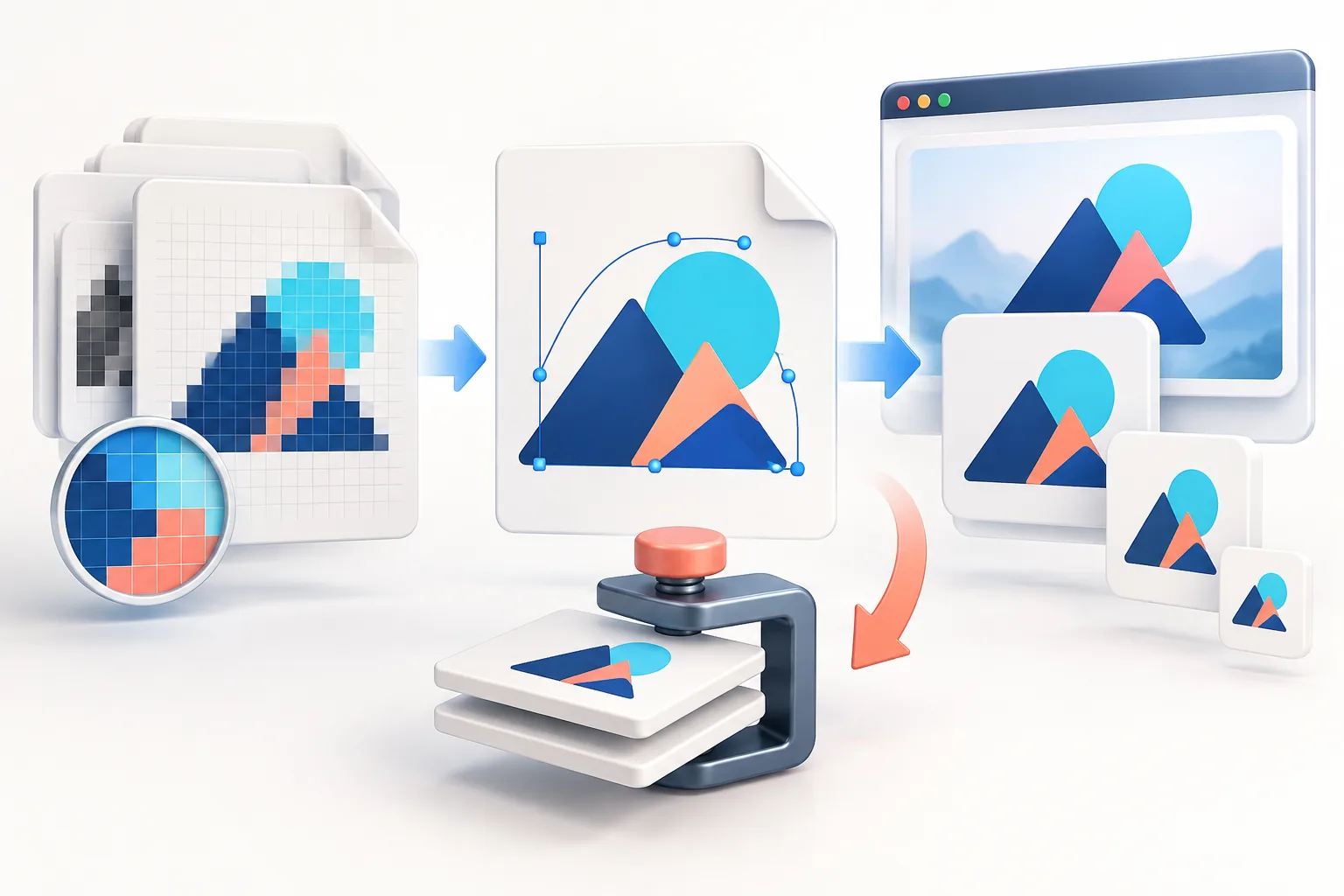
A vector tracer (also called a vectorizer or auto-tracer) turns a grid of pixels into shapes in three stages:
- Colour quantisation. It reduces the image to a small number of colours — say 4 — grouping similar shades together. Anti-aliased edge pixels are assigned to one colour or the other.
- Edge detection. It finds the boundaries between the colour regions.
- Curve fitting. It replaces each jagged pixel boundary with smooth lines and Bézier curves, simplifying where it can.
The output is a genuine SVG made of paths, so it scales without blurring. But every curve is the tracer’s interpretation of the pixels. If the pixels are blurry, compressed or tiny, the interpretation is poor: wobbly curves, rounded corners that should be sharp, and small artefacts where the tracer mistook noise for shapes.
Which logos convert well — and which do not
| Traces well | Traces poorly |
|---|---|
| 2–6 flat, solid colours | Gradients, glows, soft shadows |
| Bold shapes and thick strokes | Hairlines and fine outlines |
| Large lettering (headline size) | Small taglines and body text |
| Source 1000 px+ wide, clean edges | Small, blurry or screenshot sources |
| PNG or high-quality export | Heavily compressed JPG |
| Icons, badges, monograms, silhouettes | Photos, illustrations with texture, hand-drawn sketches with shading |
A practical test: if you could recreate the logo with a handful of flat paper cut-outs, it will trace well.
Step 1: Give the tracer the best possible source
- Use the largest version you have. More pixels per curve means smoother, more accurate paths. If the logo is under 500 px wide, the result will be approximate.
- Remove the background first if it is not plain white. A textured or off-white background becomes an extra shape. The Background Remover handles solid backgrounds.
- Do not upscale first. Enlarging a small PNG before tracing just gives the tracer blurred edges to follow. (AI upscalers are an exception worth trying — they sharpen edges — but check the letter shapes carefully afterwards.)
- Avoid JPG artefacts. The blotches around JPEG edges get traced as tiny shapes. If JPG is all you have, a slightly higher smoothing setting helps.
Step 2: Choose the right settings
The Logo to SVG converter has three presets and three fine controls:
- Flat logo — for multi-colour logos with solid fills. Start here.
- Detailed — keeps more small features; produces more paths. Use for intricate but still flat artwork.
- B&W — one colour, ideal for stamps, engraving, vinyl cutting and Cricut/Silhouette projects.
- Colours: set this to the actual number of colours in your logo (including white if it is part of the design). Too many colours creates thin slivers along every edge where anti-aliasing was interpreted as a separate colour.
- Detail: higher keeps small features but also keeps noise.
- Smoothing: higher gives rounder, cleaner curves but can soften intentional sharp corners.
Use the Compare view to check the traced version against the original and the zoom test to inspect edges at high magnification.
Step 3: Judge the result honestly
Before using the SVG anywhere important, check:
- Zoom to 400%. Curves should be smooth, corners crisp where the original was crisp, and straight lines straight.
- Path count. A clean flat logo typically traces to tens of paths. Hundreds or thousands means the tracer is capturing noise; lower the detail or colour count.
- File size. A simple traced logo should be a few KB to a few tens of KB. A 500 KB SVG is a sign of over-tracing and will be slow on websites.
- Text. Letters are the hardest part: counters (the holes in e, a, o) may close up and serif details may soften. If the lettering is not right, see below.
- Colours. Check the hex values. Quantisation can shift a brand colour slightly; fix fills in an editor if needed.
Step 4: Tidy up (optional but worth it)
A traced SVG can be opened and edited in free tools like Inkscape or Figma, or in Illustrator and Affinity Designer:
- Replace traced text with real text. Identify the font (WhatFontIs or Adobe Fonts visual search can help), type the name, match the size and spacing, then convert it to outlines. This one step often transforms a “close enough” trace into a professional vector.
- Simplify paths (Inkscape: Path → Simplify) to reduce node count.
- Snap colours to your exact brand hex values — find them with the Palette Extractor.
- Remove stray specks by selecting and deleting tiny shapes.
When to redraw instead of trace
If the logo is going on signage, vehicle wraps, embroidery or large print, or if the trace shows wobbly lettering, a manual redraw by a designer is usually the right call. For a simple logo it is typically a few hours of work, and you get a clean master file you will use for years. Ask for SVG, PDF and EPS exports plus the working file.
Also check whether a vector already exists before tracing: your original designer, printer, sign maker or embroidery company almost certainly has one.
What to do with your new SVG
- Use it as your website header logo — see PNG vs SVG for websites.
- Export crisp PNGs at any size from it for social media and email.
- Send it (as PDF) to printers.
- Build an SVG favicon (favicon guide).
Frequently asked questions
Can I convert a PNG logo to SVG for free?
Yes. A browser-based vectorizer traces the PNG into SVG paths for free. It works best for flat logos with a few solid colours and a large, clean source image.
Will converting PNG to SVG improve quality?
Only if the trace is accurate. A clean flat logo becomes infinitely scalable. A blurry or detailed logo can trace into wobbly shapes that look worse than the PNG.
Why does my traced SVG look blobby?
The source was probably small, blurry or JPEG-compressed, or the colour and detail settings were too high. Use a bigger source and set the colour count to match the logo.
Can gradients or photos be converted to SVG?
Not well. Tracing produces flat shapes, so gradients band and photos turn into posterised blobs. Keep those as PNG or get the original artwork.
Is a traced SVG good enough for printing?
For simple flat logos, often yes. For signage, embroidery or large print, check the trace at high zoom and consider a professional redraw.
Tools used in this guide
All tools run in your browser; your image files are not uploaded to our server.
Sources checked for this guide
- MDN: SVG paths tutorial
- Inkscape: tracing bitmaps tutorial
- imagetracerjs: the open-source tracing engine
Platform upload rules change. We re-check the sources above when we update a guide; if you spot something out of date, send a correction.